
CORS Errors Explained: Why Your Browser Blocks the Request (and the Exact Headers That Fix It)
A scenario-first walkthrough of how CORS works — why the Same-Origin Policy exists, what each CORS error message means, preflight requests explained, and exactly which server headers fix the problem.

This article is currently only available in English. A 日本語 translation is coming soon.
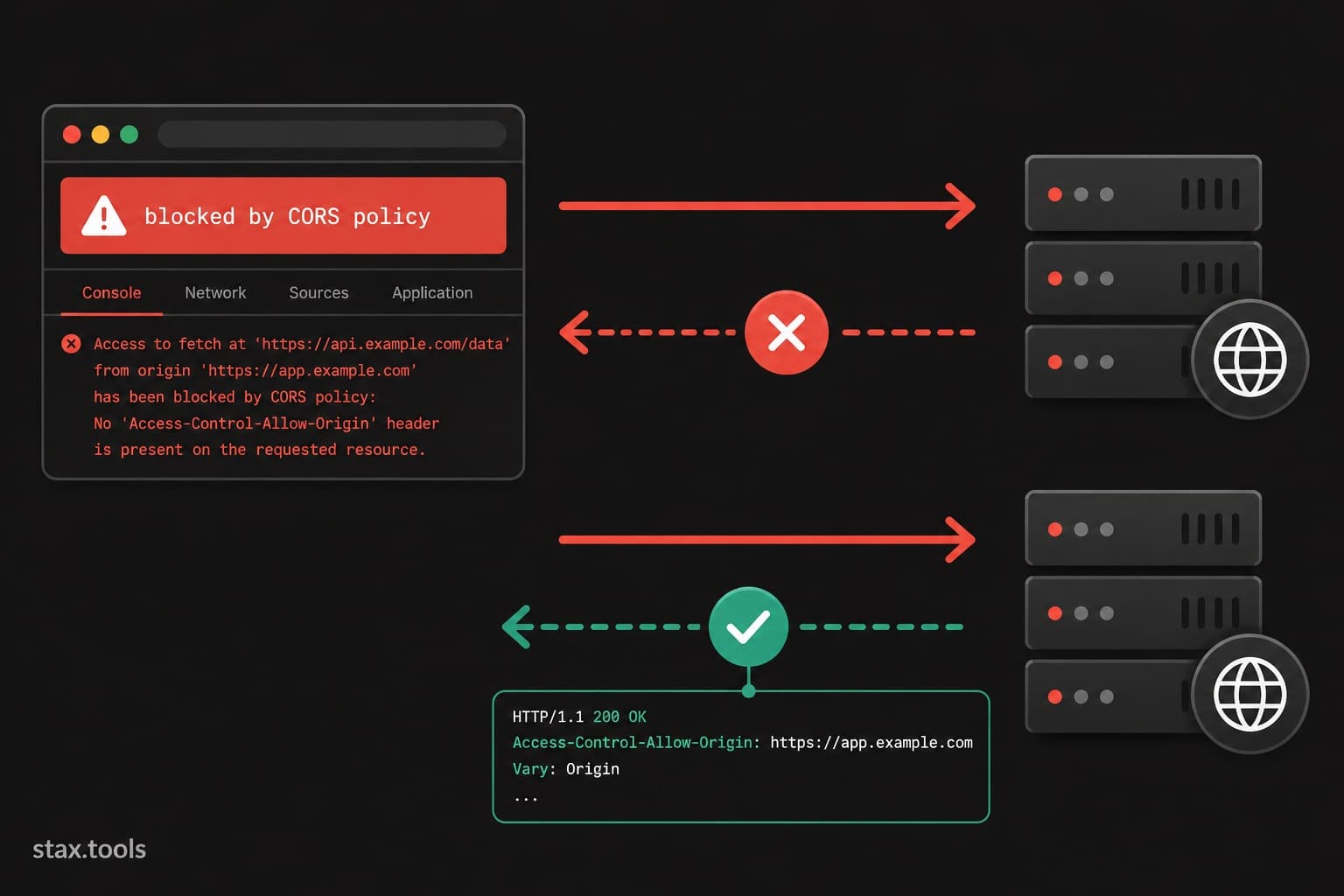
It's 3 pm. You've built a frontend on localhost:3000 that fetches data from your API on localhost:8080. The component renders. You open DevTools. The console says:
Access to fetch at 'http://localhost:8080/api/users' from origin 'http://localhost:3000'
has been blocked by CORS policy: No 'Access-Control-Allow-Origin' header is present
on the requested resource.
The request reaches your server — the server responds 200 — and the browser still blocks it. You've done nothing wrong. The browser has done nothing wrong either. This is CORS working exactly as designed.
Here's what it actually means, why it exists, and how to fix it properly.
Why the browser blocks the request
The block is enforced by the Same-Origin Policy (SOP), a security rule that every browser has implemented since Netscape Navigator 2.0 in 1995. The rule is simple: a script from origin A cannot read the response from origin B unless origin B explicitly grants permission.
An origin is the combination of scheme + hostname + port. http://localhost:3000 and http://localhost:8080 are different origins (different port). https://app.stax.tools and https://api.stax.tools are different origins (different subdomain). http://stax.tools and https://stax.tools are different origins (different scheme).
Without this policy, any JavaScript on any website could make requests to your bank, read the response, and exfiltrate your account data — because your browser sends cookies and credentials with those requests. The SOP makes this impossible.
CORS (Cross-Origin Resource Sharing) is the mechanism that lets a server say: "origin A is allowed to read my responses." It doesn't disable the SOP — it extends it with an explicit opt-in.
The scenario: frontend + separate API
Your frontend is deployed at https://app.stax.tools. Your API is at https://api.stax.tools. When your JavaScript calls:
const response = await fetch('https://api.stax.tools/users');
const data = await response.json();
The browser sends the request with an Origin header:
GET /users HTTP/1.1
Host: api.stax.tools
Origin: https://app.stax.tools
Your server returns the response. But the browser checks: does this response include a header permitting https://app.stax.tools to read it? If not, it discards the response and throws the CORS error — even though the request succeeded at the network level.
The fix is on the server. You add one response header:
Access-Control-Allow-Origin: https://app.stax.tools
Now the browser sees the permission, allows your JavaScript to read the response, and everything works.
Simple requests vs preflighted requests
Not all requests behave the same way. The browser divides cross-origin requests into two categories.
Simple requests (no preflight)
A request is "simple" if it meets all of these criteria:
- Method is
GET,HEAD, orPOST - If
POST, theContent-Typeisapplication/x-www-form-urlencoded,multipart/form-data, ortext/plain - No custom headers (no
Authorization, noX-API-Key, noContent-Type: application/json)
Simple requests go straight to the server. The browser checks the response headers and either allows or blocks.
Preflighted requests (most modern API calls)
Any request with a JSON body, a custom header, or a non-simple method (PUT, DELETE, PATCH) triggers a preflight. Before sending the real request, the browser automatically sends an OPTIONS request:
OPTIONS /users HTTP/1.1
Host: api.stax.tools
Origin: https://app.stax.tools
Access-Control-Request-Method: POST
Access-Control-Request-Headers: Content-Type, Authorization
It's asking: "before I send the actual POST with these headers, do you allow it?" Your server must respond to this OPTIONS request with the right headers:
HTTP/1.1 204 No Content
Access-Control-Allow-Origin: https://app.stax.tools
Access-Control-Allow-Methods: GET, POST, PUT, DELETE, OPTIONS
Access-Control-Allow-Headers: Content-Type, Authorization
Access-Control-Max-Age: 86400
Access-Control-Max-Age: 86400 tells the browser to cache this preflight result for 24 hours — so it doesn't re-check on every single request, which would add an extra round-trip.
If your server doesn't handle OPTIONS requests, the preflight gets a 404 or 405 and the actual request never fires. This is the most common source of CORS confusion in development.
The complete set of CORS headers
| Header | Direction | Purpose |
|---|---|---|
Access-Control-Allow-Origin |
Response | Which origins can read the response. Either a specific origin or * (wildcard). |
Access-Control-Allow-Methods |
Response (preflight) | Which HTTP methods are permitted. |
Access-Control-Allow-Headers |
Response (preflight) | Which request headers are permitted. |
Access-Control-Max-Age |
Response (preflight) | How long the browser should cache the preflight result (seconds). |
Access-Control-Allow-Credentials |
Response | Whether cookies/auth headers can be included. Must be true explicitly — * origin cannot be used with credentials. |
Access-Control-Expose-Headers |
Response | Which response headers JavaScript is allowed to read. By default only a safe subset is readable. |
Origin |
Request | Set automatically by the browser — never set manually. |
Access-Control-Request-Method |
Preflight request | The method the browser intends to use. |
Access-Control-Request-Headers |
Preflight request | The headers the browser intends to send. |
The wildcard * and why you can't use it with credentials
Access-Control-Allow-Origin: * allows any origin to read the response. It's fine for public APIs that return non-sensitive data (public weather data, public pricing, open datasets). It is not fine for authenticated endpoints.
If your request includes cookies or an Authorization header, the server must:
- Set
Access-Control-Allow-Credentials: true - Set
Access-Control-Allow-Originto the specific origin — not*
This is intentional. Wildcard + credentials would allow any website to make authenticated requests on behalf of your logged-in users.
In practice: reflect the Origin header back when the value is in your allowlist:
// Express.js example
const ALLOWED_ORIGINS = ['https://app.stax.tools', 'https://stax.tools'];

app.use((req, res, next) => {
  const origin = req.headers.origin;
  if (ALLOWED_ORIGINS.includes(origin)) {
    res.setHeader('Access-Control-Allow-Origin', origin);
    res.setHeader('Access-Control-Allow-Credentials', 'true');
  }
  next();
});
Common CORS error messages decoded
No 'Access-Control-Allow-Origin' header is present
The server response is missing the header entirely. Either CORS isn't configured on the server, or the request hit an error path that bypasses your CORS middleware.
The value of the 'Access-Control-Allow-Origin' header...does not match the supplied origin
You have Access-Control-Allow-Origin: https://www.stax.tools but the request came from https://stax.tools (no www). These are different origins. Ensure your allowlist covers every variation you serve.
Request header field Authorization is not allowed by Access-Control-Allow-Headers in preflight response
Your CORS config doesn't include Authorization in Access-Control-Allow-Headers. Add it.
Method DELETE is not allowed by Access-Control-Allow-Methods
Your allowed methods list doesn't include DELETE. Add DELETE to Access-Control-Allow-Methods.
Response to preflight request doesn't pass access control check: It does not have HTTP ok status
Your server returns a non-2xx status on the OPTIONS preflight. Ensure OPTIONS routes return 200 or 204.
The "just use a proxy" option and when it makes sense
During local development, you can avoid CORS entirely by proxying requests through the same origin as your dev server. In Vite:
// vite.config.ts
export default {
  server: {
    proxy: {
      '/api': 'http://localhost:8080'
    }
  }
}
This makes localhost:3000/api/users proxy to localhost:8080/api/users — same origin, no CORS check. This is the right approach for local development when you don't control the API.
In production, however, you cannot avoid proper CORS configuration. The proxy approach is a dev convenience only.
CORS does not affect Postman or curl
This is the question every developer asks once. When you test your API in Postman or with curl, CORS errors don't appear — even if your browser blocks the same request. That's because CORS is entirely a browser enforcement. Postman and curl are not browsers; they don't implement the Same-Origin Policy and don't send preflight requests. If your API works in Postman but not in the browser, the server-side logic is fine — you simply need to add the CORS headers.
Quick implementation reference
Express.js (Node.js)
const cors = require('cors');
app.use(cors({ origin: 'https://app.stax.tools', credentials: true }));
// Don't forget: app.options('*', cors()); for preflight
FastAPI (Python)
from fastapi.middleware.cors import CORSMiddleware
app.add_middleware(CORSMiddleware, allow_origins=["https://app.stax.tools"],
  allow_credentials=True, allow_methods=["*"], allow_headers=["*"])
Nginx
add_header Access-Control-Allow-Origin "https://app.stax.tools" always;
add_header Access-Control-Allow-Methods "GET, POST, PUT, DELETE, OPTIONS" always;
add_header Access-Control-Allow-Headers "Authorization, Content-Type" always;
if ($request_method = OPTIONS) { return 204; }
By Harshil Shah, developer and founder at Stax Tools. CORS header behaviour verified against the WHATWG Fetch specification and MDN Web Docs.
Sources & methodology
- WHATWG Fetch Standard — fetch.spec.whatwg.org (sections 3.2 CORS protocol)
- MDN Web Docs, "Cross-Origin Resource Sharing (CORS)" — developer.mozilla.org
- W3C Same-Origin Policy — w3.org/Security/wiki/Same_Origin_Policy
Harshil
Developer & Founder, stax.tools
Harshil is the developer behind stax.tools, building privacy-first tools that run entirely in your browser.
More by Harshil →Found this useful?
Browse 235+ free privacy-first tools — no login, no uploads, instant results.