
UTF-8, Unicode, and Character Encoding: What Every Developer Needs to Know
Why mojibake happens, how Unicode code points map to UTF-8 bytes, the difference between ASCII, Unicode, and UTF-8, and why 'just use UTF-8 everywhere' is correct advice but still requires understanding.

This article is currently only available in English. A Français translation is coming soon.
The text on your screen looks correct. Save it to a database, open it in another application, and suddenly half the characters are replaced with ’ or é or a row of question marks. This is mojibake — text that has been decoded with the wrong encoding. It happens when the encoding used to write the bytes doesn't match the encoding used to read them.
Understanding why this happens, and why "just use UTF-8" solves most cases, requires understanding what encoding actually is.
The problem encoding solves
Computers store everything as numbers. "A" must be stored as some number. "é" must be stored as some number. "中" must be stored as some number. Encoding is the agreement about which number maps to which character.
In the beginning, ASCII (American Standard Code for Information Interchange, 1963) used 7 bits — 128 possible values — to encode 95 printable characters: uppercase and lowercase Latin letters, digits, punctuation, and 33 control characters. A is 65. a is 97. ! is 33. Space is 32.
ASCII worked perfectly for English. It had no room for é, ü, ñ, 中, 日, 한, अ, →, €, or emoji.
Unicode: the universal character set
Unicode is not an encoding — it's a character set. It assigns a unique number (called a code point) to every character in every writing system. As of Unicode 15.1 (September 2023), it defines 149,813 characters across 161 scripts.
Code points are written as U+ followed by a four-to-six digit hex number:
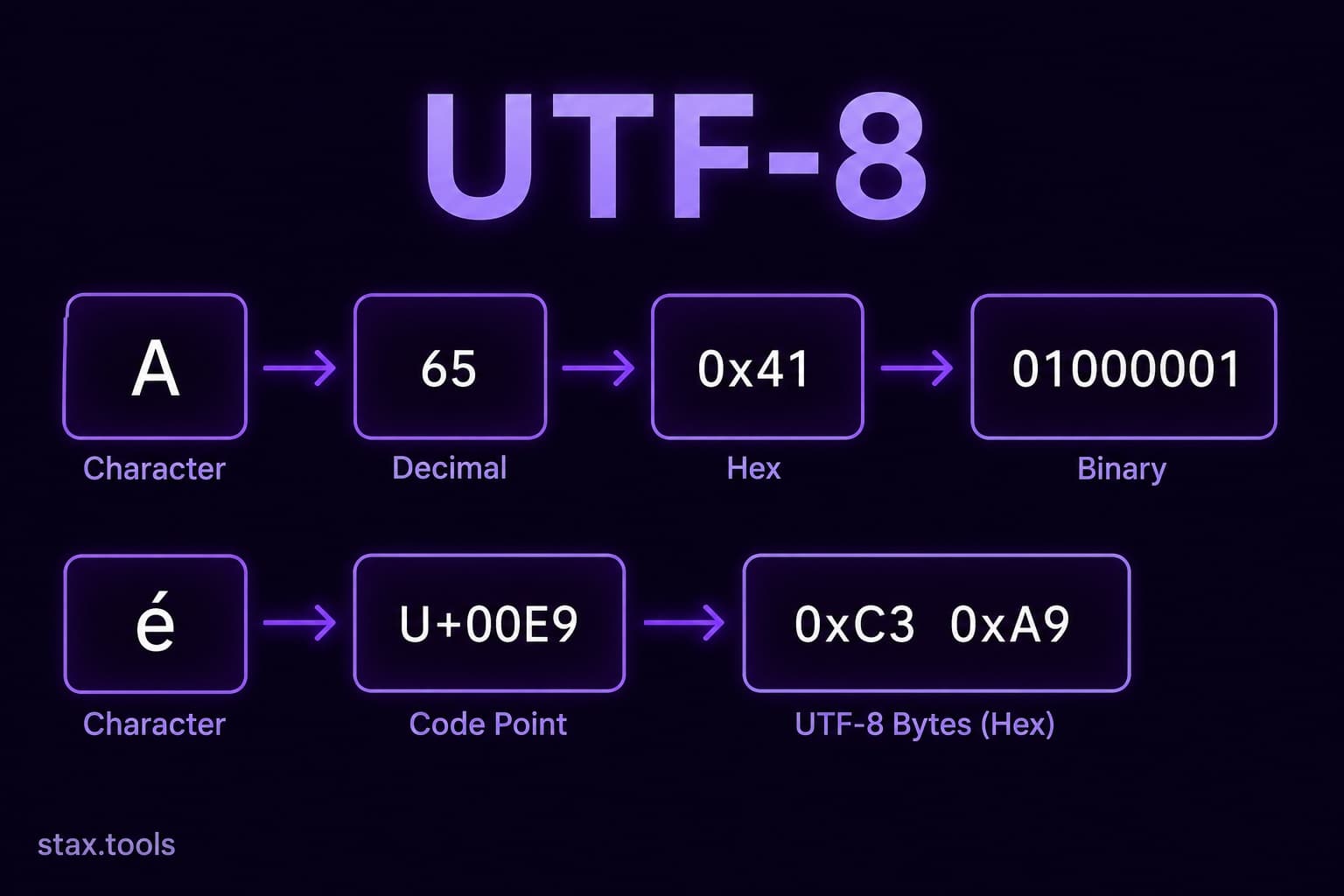
U+0041→AU+00E9→éU+4E2D→中U+1F600→ 😀
Unicode solves "which number means which character." It does not specify how to store that number in bytes. That's what encodings like UTF-8, UTF-16, and UTF-32 define.
Inspect code points for any character at the Stax Unicode Converter.
UTF-8: variable-width encoding
UTF-8 (Unicode Transformation Format — 8-bit) is the encoding that maps Unicode code points to byte sequences. It's variable-width: characters use 1 to 4 bytes depending on the code point.
| Code point range | Bytes used | Bit pattern |
|---|---|---|
| U+0000 – U+007F (ASCII) | 1 | 0xxxxxxx |
| U+0080 – U+07FF | 2 | 110xxxxx 10xxxxxx |
| U+0800 – U+FFFF | 3 | 1110xxxx 10xxxxxx 10xxxxxx |
| U+10000 – U+10FFFF | 4 | 11110xxx 10xxxxxx 10xxxxxx 10xxxxxx |
The key insight: UTF-8 is backward-compatible with ASCII. Every ASCII character (code point ≤ 127) is encoded as a single byte with the same value. An ASCII-only file in UTF-8 is byte-for-byte identical to the same file in ASCII. This is why UTF-8 became the dominant encoding on the web — existing ASCII content worked without modification.
Example — encoding é (U+00E9):
- Code point 0x00E9 = 233 decimal = binary
11101001 - Range U+0080–U+07FF: use 2-byte pattern
110xxxxx 10xxxxxx - Fill in bits:
11000011 10101001= hexC3 A9 - UTF-8 bytes:
0xC3 0xA9
URL-encoded: %C3%A9 — exactly what you see when é appears in a URL.
UTF-16 and UTF-32
UTF-16 uses 2 bytes for characters in the Basic Multilingual Plane (U+0000–U+FFFF) and 4 bytes (via surrogate pairs) for characters above that. It's used internally by Windows, Java, JavaScript (which represents strings as UTF-16), and .NET. A pure-ASCII string in UTF-16 is twice the size of the same UTF-8 string — every character takes 2 bytes.
UTF-32 uses 4 bytes for every character regardless of code point. It's fast to index (character N is at byte 4N) but wastes memory. Used in some Unix/Linux internal representations. Rarely seen in file storage or network transmission.
| Encoding | Size per ASCII char | Size per CJK char | BOM required? |
|---|---|---|---|
| ASCII | 1 byte | N/A | No |
| UTF-8 | 1 byte | 3 bytes | Optional |
| UTF-16 | 2 bytes | 2 bytes | Yes (to indicate byte order) |
| UTF-32 | 4 bytes | 4 bytes | Yes |
What causes mojibake
Mojibake occurs when bytes written in encoding A are read as encoding B. The most common patterns:
UTF-8 read as Latin-1 (ISO-8859-1):
é (UTF-8: 0xC3 0xA9) read as Latin-1 produces two characters: à (0xC3) and © (0xA9). This is the é mojibake seen when MySQL is configured with Latin-1 charset but the application sends UTF-8.
UTF-8 read as Windows-1252:
Similar to Latin-1 but slightly different character mappings. The ’ pattern is a UTF-8 right single quotation mark (U+2019, encoded as E2 80 99) read as Windows-1252 (where E2 = â, 80 = €, 99 = ™).
BOM confusion:
UTF-8 can optionally start with a byte order mark (EF BB BF). Some editors (Notepad on Windows) add it; most Unix tools and browsers ignore or strip it. A file with a UTF-8 BOM opened by software that doesn't expect it shows  at the start of the content.
Why "just use UTF-8 everywhere" is correct
UTF-8 has been the dominant web encoding since around 2010, surpassing ASCII and Latin-1. As of May 2026, W3Techs estimates that over 98% of websites use UTF-8. The HTTP Content-Type header should specify charset=utf-8. HTML5 defaults to UTF-8. Every modern database (MySQL, PostgreSQL, SQLite, MongoDB) supports UTF-8. Every modern OS file system handles UTF-8.
The advice "use UTF-8 everywhere" means:
- Save source files as UTF-8 (most editors default to this now)
- Set database connection charset to
utf8mb4(notutf8in MySQL — MySQL'sutf8is a 3-byte variant that cannot store emoji;utf8mb4is proper UTF-8) - Set HTTP headers:
Content-Type: text/html; charset=utf-8 - Set HTML meta:
<meta charset="UTF-8"> - Use
utf-8explicitly inopen()calls in Python:open(filename, encoding='utf-8')
The failure mode is mixing — one layer of your stack defaults to Latin-1 while everything else is UTF-8. The database encoding, the connection charset, the column charset, the application layer, and the HTTP headers must all agree.
The emoji problem: UTF-8 byte length ≠ character count
A string's byte length in UTF-8 is not the same as its character count. len("café") in Python 3 returns 4 (characters), but the UTF-8 byte length is 5 (the é takes 2 bytes). This matters for:
- Database column limits (MySQL VARCHAR(255) is 255 characters, but can reject strings if byte length exceeds the internal limit in some configurations)
- API rate limits that count bytes, not characters
- Truncation functions that operate on bytes — truncating
caféat byte 4 producescaf�(a broken multi-byte sequence)
Emoji are even larger: 😀 is U+1F600, encoded in UTF-8 as 4 bytes. A string of 10 emoji is 40 bytes but 10 characters.
Always measure string length in code points or grapheme clusters for user-facing operations, and in bytes for storage/network operations.
By Harshil Shah, developer and founder at Stax Tools. Unicode character count sourced from the Unicode 15.1 character database.
Sources & methodology
- RFC 3629 — UTF-8, a transformation format of ISO 10646, IETF, November 2003
- Unicode 15.1 Core Specification — unicode.org/versions/Unicode15.1.0
- W3Techs Web Technology Surveys — UTF-8 usage statistics, w3techs.com (May 2026)
- MySQL Documentation — Character Sets and Collations, dev.mysql.com (utf8mb4 vs utf8)
Harshil
Developer & Founder, stax.tools
Harshil is the developer behind stax.tools, building privacy-first tools that run entirely in your browser.
More by Harshil →Found this useful?
Browse 235+ free privacy-first tools — no login, no uploads, instant results.